
This page is part of the classic checkout and invoice experience seen on orgs where Nimble AMS was installed prior to the Nimble AMS Summer '17 release. This page is replaced by the My Invoice Page.
The Invoice page displays an outstanding order and users can pay the invoice. The page also displays all standard Nimble AMS products and can be customized to show custom products so users can pay off any invoice.
Viewing Invoices
Constituents can view different types of invoices based on their relationship to a company.
-
Individual Invoices—Constituents, whether affiliated with a company or not, can review and pay for a personal outstanding balance.
-
Company Invoices—Constituents who are primarily affiliated with a company, and are company managers, can review and pay for a personal or company outstanding balance.
Reviewing an Outstanding Order
Constituents can review all products within an outstanding order and see the prices for each.
Adding Donations with a Membership Renewal
If an outstanding order contains a membership renewal, and staff has configured the membership type with donation options, an additional card displays so constituents have the opportunity to make a donation. Constituents can pick to what fund(s) and what amount they wish to give.
Paying an Invoice
Once constituents have reviewed the order, they can pay using the payment methods set up in your org.
Note
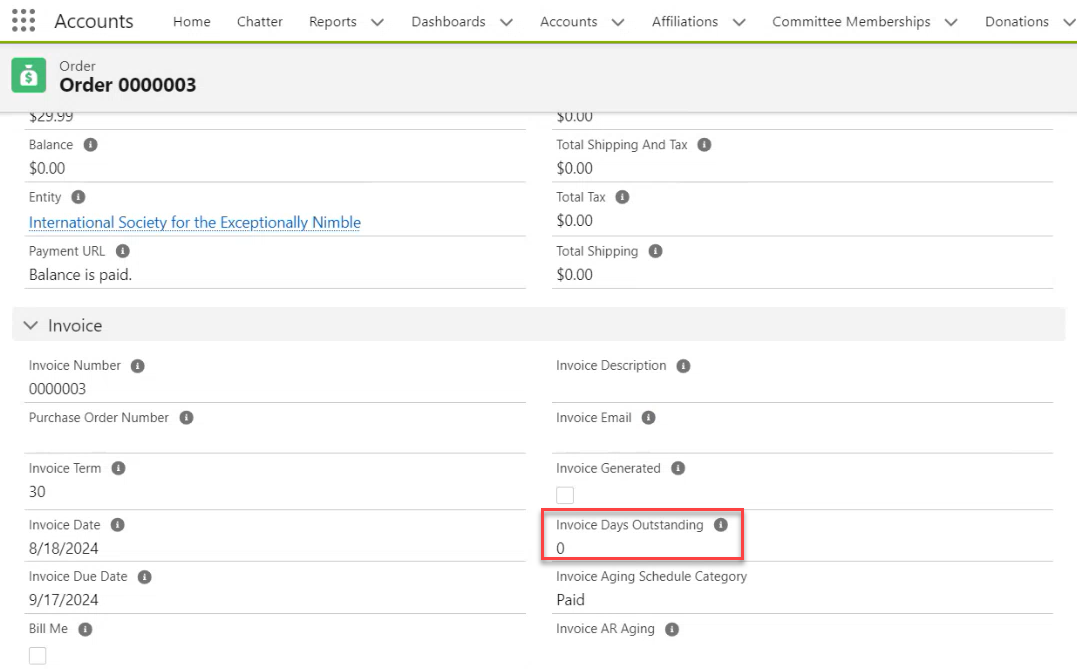
Once the order or invoice is fully paid and no balance remains, the "Invoice Days Outstanding" field on the order record page automatically resets to zero.
Updating Order Information with Bill Me
Alternatively, Trusted individuals can select Pay Later - Bill Me on the Payment Options card to update the purchase order number, the description on the invoice, as well as any other information you are collecting and submit the updates to the invoice.
Page Information
|
Page |
/apex/invoice |
|---|---|
|
Name |
Invoice |
|
Controller Name |
InvoiceController |
|
Template |
AccountTemplate |
|
Heading Label |
OutstandingInvoice |
|
Description Label |
ReviewPayOutstandingInvoice |
Cards on the Page
|
Name |
|---|
|
MembershipDetails |
|
RegistrationDetails |
|
SubscriptionDetails |
|
ItemDetails |
|
OptionalDonation |
|
PaymentOptions |
|
CartPaymentMethodSelection |
|
ECheckDisclaimer |
|
Payment |
|
TotalDisplay |